girasol-tvbro-doc
KanbanBro Documentation
Main Screen
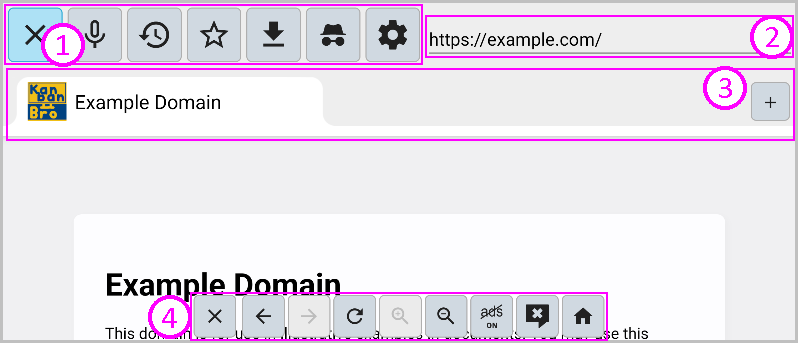
- Menu Bar
- Address Bar
- Tab Bar
- Bottom Buttons Bar
You can open and close the menu bar with the Back button.
Menu Bar
You can perform various actions from the buttons.

- Close button: Closes the app.
- Microphone button: Starts the microphone.
- History button: Opens the browsing history of pages.
- Bookmark button: Opens the bookmarks menu.
- Download history button: Opens the download history.
- Incognito mode button: Restarts the app in incognito mode.
- Settings button: Opens the settings screen.
Address Bar
It displays the address of the currently open tab. Here, you can enter a website address or perform a search.
Tab Bar
Displays a list of the currently open tabs.
When you switch tabs, the content of the previously open tab is unloaded.
Use the + button at the right end to open a new tab.

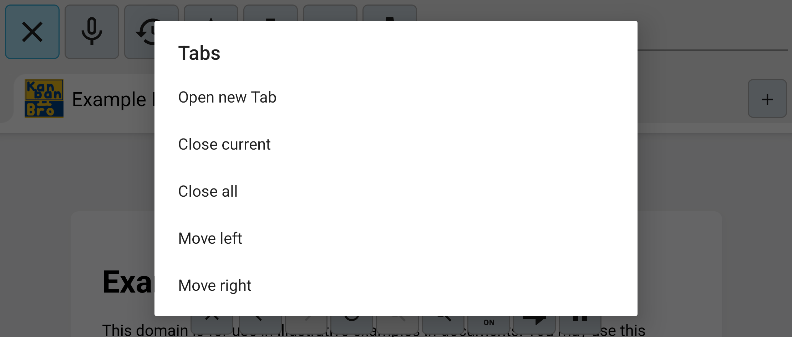
Long press a tab to open the tab context menu.
Bottom Buttons Bar

- Close button: Closes the currently open tab.
- Back button: Navigates to the previous page.
- Forward button: Navigates to the next page.
- Update button: Reloads the page.
- Ad block button: Toggles the ad blocker enabled state.
- Popup block button: Configures popup blocking.
- Home button: Displays the home page.
Settings Screen
■■TODO To fill this section, it is better to localize KanbanBro into Japanese first ■■